Allergens
Allergen data is the part of BakeCheck that matters most. Everything else — costs, margins, storefront — is convenience. This page explains what the app looks for, what it does automatically, and what stays your judgement.
The 14 allergens
UK law requires these 14 to be declared and emphasised wherever they appear in a food. BakeCheck recognises all 14, and the words in the right-hand column are what it watches for when reading an ingredient's composition.
| Allergen | Recognised from words like |
|---|---|
| Gluten | gluten, wheat, rye, barley, oats, spelt, kamut |
| Crustaceans | crustacean, crab, lobster, prawn, shrimp, crayfish |
| Eggs | egg, eggs, albumin, mayonnaise |
| Fish | fish, anchovy, salmon, tuna, cod, haddock |
| Peanuts | peanut, groundnut |
| Soybeans | soy, soya, soybean, soja, lecithin |
| Milk | milk, dairy, butter, cheese, cream, yogurt, whey, casein, lactose |
| Nuts | almond, hazelnut, walnut, cashew, pecan, pistachio, macadamia, brazil nut, pine nut, chestnut |
| Celery | celery, celeriac |
| Mustard | mustard |
| Sesame | sesame, tahini |
| Sulphur dioxide | sulphur dioxide, sulphites, E220–E228 |
| Lupin | lupin, lupine |
| Molluscs | mollusc, snail, squid, octopus, clam, mussel, oyster, scallop |
Detection is a helper, not a decision
When you type an ingredient's composition, BakeCheck scans it for those words and offers a suggested allergen list. That is a convenience, and it is only as good as the composition you typed. It cannot know about:
- an allergen named in a way it doesn't recognise (a brand name, a trade term),
- "may contain" or cross-contamination warnings on the packet,
- anything the supplier changed since you last read the label.
Always check the suggestion against the actual packaging and edit it if it is
wrong. You can type your own comma-separated list at any time, for example
Gluten, Milk. What you save is what BakeCheck treats as the truth.
Blank is not "none"
An empty allergens field does not mean "this ingredient has no allergens". It means nobody has said yet. Those are very different things, and BakeCheck will not guess between them: while any ingredient in a recipe has a blank allergens field, that product cannot have a label generated at all.
If an ingredient genuinely contains none of the 14, say so explicitly — type
None in its allergens field, or use the Declare no allergens link under the
field. The ingredient then counts as declared and stops blocking labels.
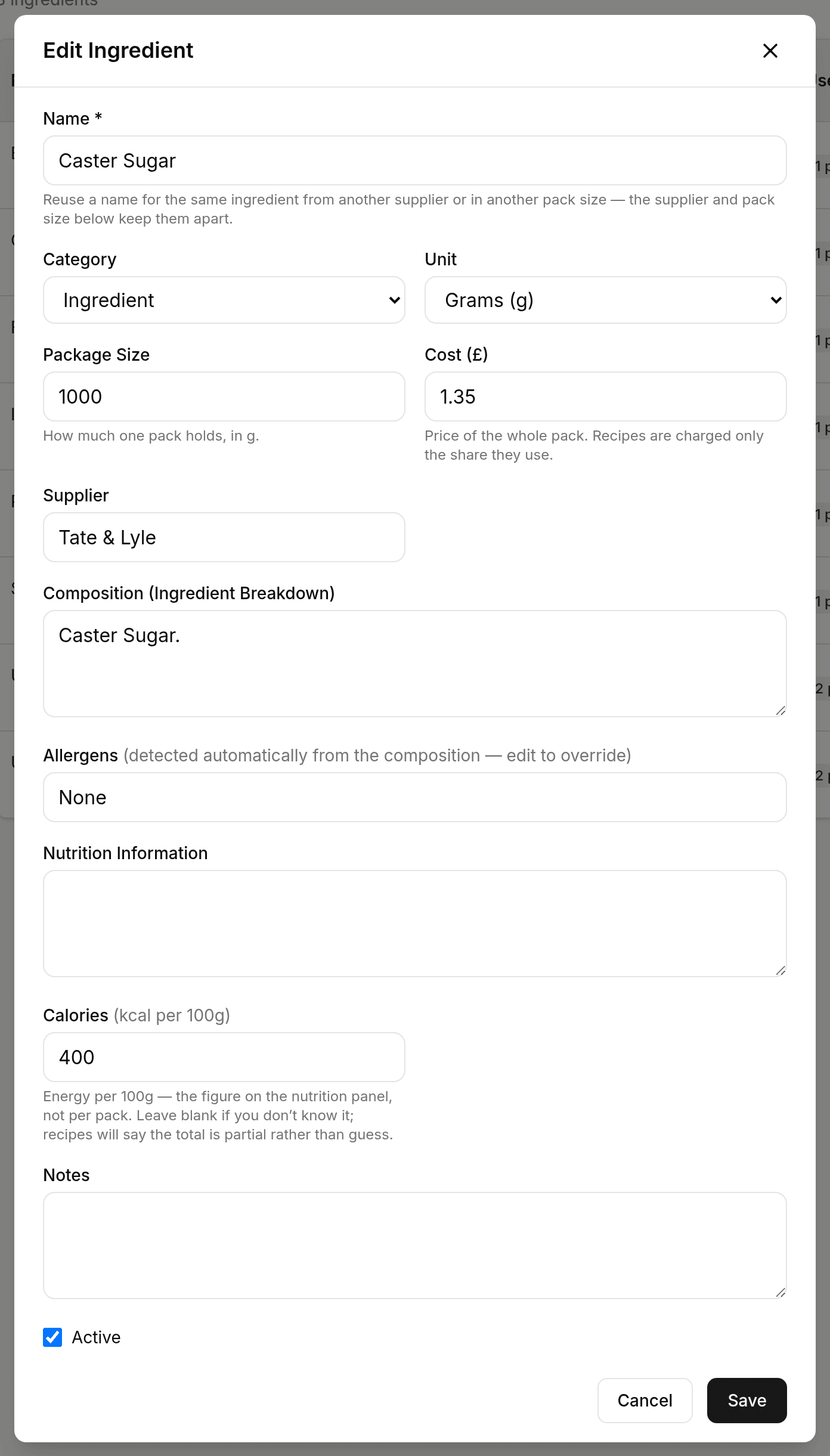
"None" is a declaration. Blank is not.
This is the one place the app is deliberately obstructive. A missing allergen is the failure that hurts someone.
"May contain"
A label's May contain line is built by rule, not written by the AI, from three places:
- The packet. Wording such as "may contain egg", "traces of nuts" or "made in a factory that handles peanuts" in an ingredient's composition. Copy it in from the packet as part of the composition; BakeCheck takes it out of that ingredient's brackets and states it once, at the end of the label.
- Your kitchen. If your kitchen handles nuts and you cannot keep them apart, tick them under Settings → Kitchen allergens. Every label then says the product may contain them. Changing this list marks your approved labels out of date, because what they print has changed.
- One print run. If today's batch was made next to something, open May contain, this print when you print or download. What you tick goes on those stickers only. The approved label stays as it is.
An allergen the product contains is never repeated in the May contain line. A cookie made with egg says EGG in its ingredients, not "may contain eggs".
Keep it specific. A May contain line that lists everything teaches allergic customers to ignore it.
Packaging is exempt
Ingredients in the Packaging category — boxes, lolly sticks, tamper-proof lids — are not eaten, so they never appear in an ingredient list and are never asked for a composition or an allergen declaration. They don't block labels, and they don't show up on your dashboard as missing data. Their cost still counts towards the product. Decoration is eaten, so it is treated as food like anything else.
Labels you approved before this rule existed
Labels approved earlier are not withdrawn. If you have one printing on a product whose ingredients were never declared, it keeps working exactly as it did — nothing disappears from under you mid-bake.
But that label was produced without a complete allergen declaration behind it, so it has not been checked against one. Your dashboard lists those products under Cannot be labelled — missing ingredient data, at the top of the list and marked label in use. Work through those first: fill in the allergens for the ingredients named next to each one, then regenerate and approve the label so what you are printing rests on a declaration you actually made.
Allergens carry through sub-recipes
If a product uses another product as a component — a frangipane inside a tart, a sponge inside a gateau — the allergens of everything inside that component are rolled up into the parent product's label automatically, however many levels deep it goes (up to 8).
This is a real safety benefit and a real risk at the same time: the nuts in your frangipane will appear on the tart's label without you doing anything, which is exactly right — but it also means an ingredient with missing data deep inside a sub-recipe blocks the labels of every product built on top of it. When a label is blocked by an ingredient you don't recognise, that is usually why. See the Products guide for how component quantities work.
Emphasis and the coverage check
UK labels must emphasise allergens so they stand out from the rest of the ingredient list. BakeCheck writes them in CAPITALS.
After a draft is generated, a deterministic check — plain code, not the AI — compares the allergens rolled up from your ingredients against the allergens actually emphasised in the label text. If anything expected is missing, the check fails and that label cannot be approved. This check is the reason the label text isn't editable by hand: a label you could retype is a label the check can no longer vouch for.
Next: generate a label, or see troubleshooting if something is blocked.